Introduction to the Insta 360 x5
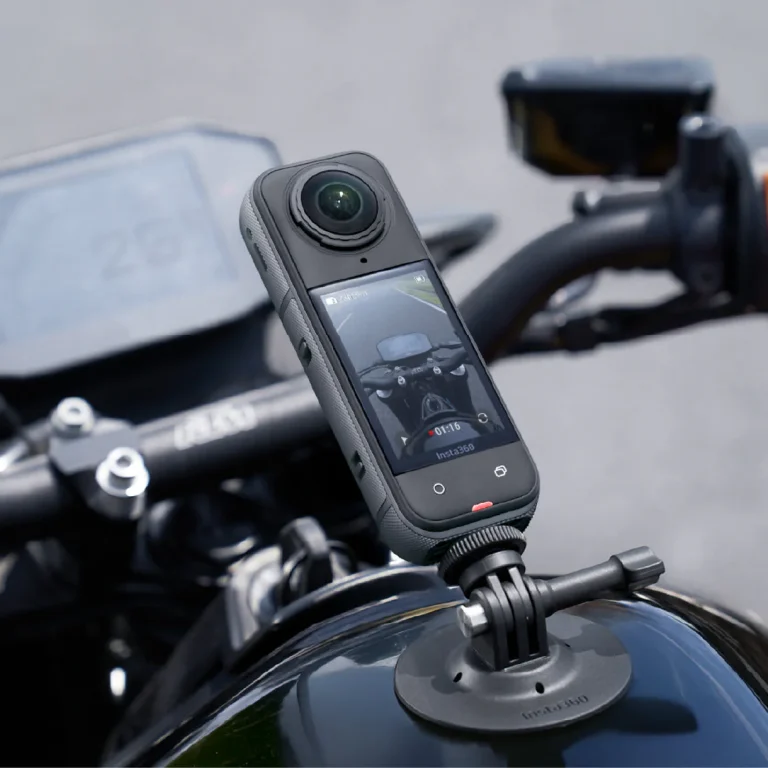
In the world of compact and versatile cameras, the Insta 360 x5 stands out as an exceptional device that empowers users to capture immersive 360-degree content effortlessly. With advanced technology that allows for seamless video and photo capture, it caters to a wide range of creators—be it travelers documenting their adventures, content creators looking for fresh perspectives, or casual users wanting to preserve memories. The Insta 360 x5 doesn't just record moments; it transforms them into interactive experiences that can be shared across multiple platforms.
Key Features of the Insta 360 x5
The Insta 360 x5 is packed with innovative features designed to enhance user experience and content quality. Here are some of its standout characteristics:
- High Resolution and Image Quality: With dual-lens capabilities, it excels in delivering high-resolution images and 5.7K video quality, making it suitable for both amateur and professional use.
- FlowState Stabilization: This advanced stabilization technology ensures smooth footage, eliminating shakes and jitters even during dynamic movements.
- Multiple Shooting Modes: Users can select from various modes such as time-lapse, bullet time, and HDR modes, allowing for creative freedom in how they capture scenes.
- User-Friendly Interface: The intuitive touchscreen and mobile app integration make it easy to operate, adjust settings, and manage your content.
- Water-Resistant Design: The camera is designed to withstand various outdoor conditions, enabling users to take it on any adventure without fear of damage.
Why Choose the Insta 360 x5?
When it comes to choosing a camera that offers versatility and quality, the Insta 360 x5 shines as a top choice. Its user-friendly interface makes it accessible to beginners, while its extensive feature set caters to advanced users looking for professional results. Moreover, it supports 360-degree capture, enabling users to create interactive and engaging content that can be viewed from multiple angles. Its appeal is also enhanced by strong community support, tutorials, and accessory options that help users maximize their creativity.
Getting Started with Your Insta 360 x5
Setting up your Insta 360 x5 is a straightforward process. The first step involves charging the device and installing the accompanying mobile app, which acts as a control center for editing and sharing your content. Once charged, turn it on and familiarize yourself with the touchscreen interface. The app can also be linked to manage your camera settings remotely. For those just starting out, exploring preset modes can help ease the learning curve and kickstart creativity.
Using the Insta 360 x5 for Different Settings
Outdoor Adventures and Travel
The Insta 360 x5 is ideally suited for capturing outdoor adventures, from hiking in the mountains to snorkeling in clear waters. Its durable design and high-resolution capabilities make it a valuable companion for travelers. Users can document breathtaking landscapes, candid moments with friends, and immersive experiences in nature. By utilizing features like live streaming and time-lapse, travelers can share real-time experiences or transform long journeys into exciting highlights. With its capability to capture 360-degree scenes, viewers can relive adventures and explore every angle of the environment.
Events and Celebrations
Social gatherings, including weddings, birthday parties, and events, benefit greatly from the Insta 360 x5's immersive capabilities. Capturing these moments in 360 degrees provides a unique lens through which participants can experience the joy of the event later on. Users can focus on grand moments like ceremonies and speeches, while also capturing the candid interactions among guests. The flexibility in shooting modes allows for creativity, whether it’s a group shot with everyone included or a dynamic view of a dance floor. Sharing these memories is easy via the mobile app, making it convenient to distribute content across platforms.
Creative Projects and Artistic Endeavors
For artists and content creators, the Insta 360 x5 serves as a powerful tool for inventive storytelling. Its high-quality footage complements various artistic projects, whether making short films, virtual tours, or dance performances. Users can experiment with different perspectives, incorporating shots that showcase dynamic movement or visually intricate environments. Additionally, its editing features allow for enhancements that can elevate the final product. Creatives can blend scenes together seamlessly, providing a richer narrative in their final output, which can excite viewers and expand the creative limits of traditional photography and videography.
Tips for Maximizing the Insta 360 x5 Experience
Optimal Settings and Adjustments
To ensure the best possible experience with the Insta 360 x5, it’s crucial to familiarize yourself with its various settings and customizable options. Before heading out to capture content, consider adjusting video resolution based on your output needs; for high-quality production, choose 5.7K resolution. Experimenting with different frame rates can also provide enhanced effects for action shots or slow-motion captures. Understanding lighting conditions and activating HDR can significantly improve image quality in challenging environments. Remember, practice makes perfect; take the time to learn how each setting affects your results.
Editing and Enhancing Your Footage
Once content is captured, the editing phase is where creativity truly flourishes. The Insta 360 Studio software and mobile app present an array of editing tools designed to enhance videos and images. Users can trim clips, adjust colors, and add music or special effects. Engaging features like SmartTrack allow automatic tracking of subjects, creating dynamic presentations. Users should also explore templates available within the app for quicker edits. Finally, don’t hesitate to experiment with combinations of traditional editing techniques alongside the camera's innovative effects to bring fresh life to your content.
Sharing Your Content Effectively
Sharing your content should be as simple as capturing it. The Insta 360 x5 allows for direct uploads to social media platforms, ensuring your experiences can be shared widely with great ease. Use the mobile app to streamline this process; it offers options for crafting engaging captions and selecting the best moments to share. Consider formatting your content for each platform, as what works for Instagram might differ from YouTube. Additionally, engaging with your audience through comments and feedback can lead to improved visibility for your uploads and build a supportive community around your content.
Comparing Insta 360 x5 to Other Cameras
Camera Specifications and Performance
When comparing the Insta 360 x5 to other cameras, key specifications are crucial in determining value. Not only does it boast high-resolution capabilities, but its dual-lens setup also facilitates immersive 360-degree capture that many traditional cameras cannot provide. Furthermore, its stabilization technology outperforms numerous competitors, ensuring smooth, jitter-free footage, which is vital for high-action scenarios. Assessing performance in various lighting and conditions reveals the x5 consistently delivers excellent image quality, along with features like live streaming that are becoming essential for content creators today.
Value for Money
The Insta 360 x5 offers exceptional value for users looking to dive into the world of immersive content creation without breaking the bank. Yes, it’s a premium option, but its feature set, durability, and use cases facilitate a return on investment that supports both creativity and professional endeavors. When comparing similar products, the x5 often provides functionalities that justify its price point, especially for individuals committed to producing high-quality, 360-degree content. Moreover, continuous software updates add value, ensuring users have access to the latest features and fixes.
User Feedback and Reviews
Users frequently commend the Insta 360 x5 for its innovative approach to content capturing. Reviews highlight the ease of use, quality of imagery, and array of creative options it provides. Customers appreciate how well the device performs in outdoor settings and the consistent results it yields. Areas for improvement—such as battery life or specific software issues—are also noted, but user feedback often emphasizes how the x5 excels overall in performance and reliability. Engaging with user reviews can provide insights into practical experiences, enhancing the understanding of its capabilities in real-world situations.
Frequently Asked Questions about the Insta 360 x5
What unique features does the Insta 360 x5 offer?
The Insta 360 x5 features dual lenses for 360-degree capture, FlowState stabilization for smooth videos, and multiple creative shooting modes, all providing an excellent platform for immersive content creation.
How do I take care of my Insta 360 x5?
To care for your Insta 360 x5, keep it clean and dry, use a protective case during activities, regularly update the software, and store it in a cool, dry place when not in use.
Can I use the Insta 360 x5 in low-light conditions?
Yes, the Insta 360 x5 performs admirably in low-light situations, especially when using the HDR mode, which enhances captures without introducing excessive noise.
What accessories are compatible with the Insta 360 x5?
The Insta 360 x5 is compatible with a variety of accessories including tripods, selfie sticks, external batteries, and protective cases to enhance usability and creative options.
How to update the software on my Insta 360 x5?
To update your Insta 360 x5 software, connect it to your mobile app or desktop software, navigate to the updates section, and follow the prompts to download and install the latest version.